Vectrum Code
A native T3 Code-style desktop client for coding agents, built with GPUI and GPUI Kit. It drives Claude Code and Pi.
Every thread runs its own agent process in the background. Claude Code threads talk to the
claude CLI over the stream-json protocol the Claude Agent SDKs use
(--input-format/--output-format stream-json plus the stdio control channel). Pi threads
talk to pi --mode rpc over its JSONL RPC protocol.
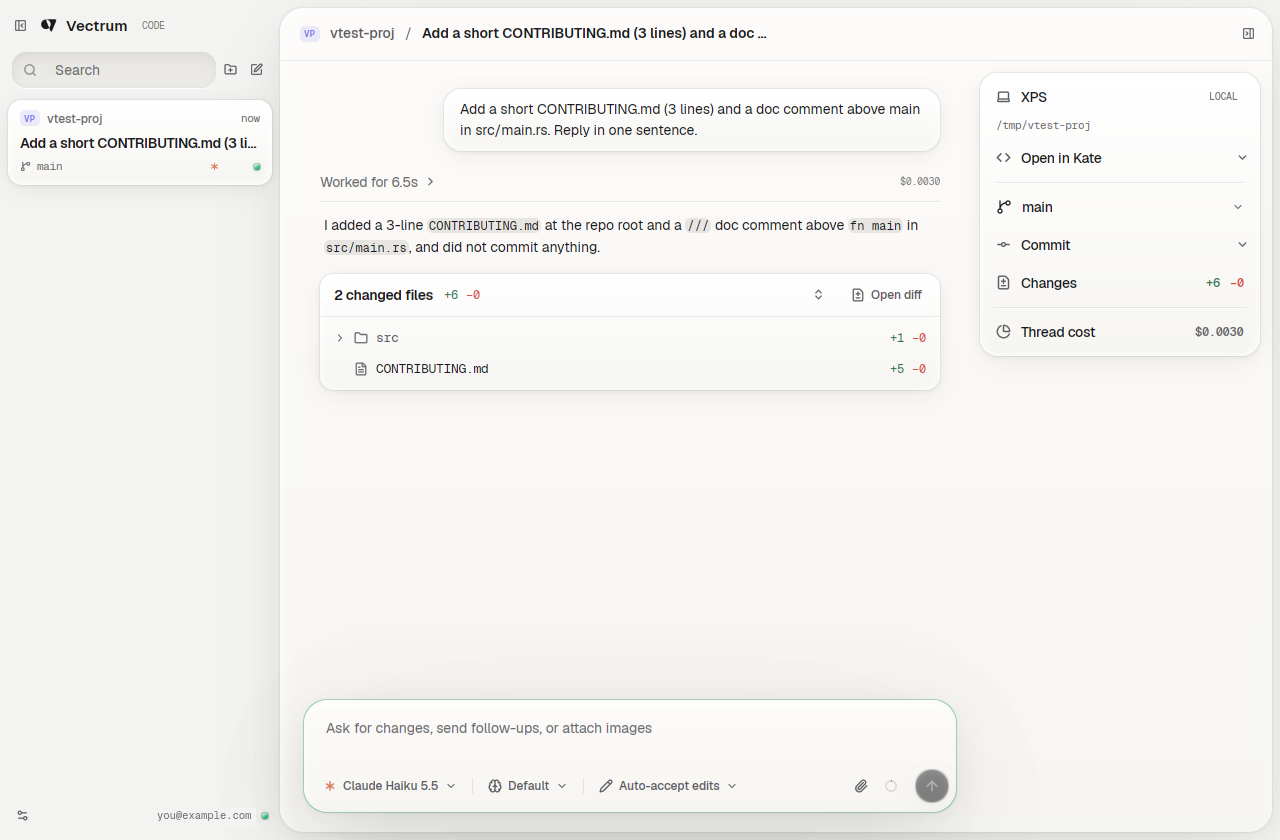
The layout and workflow follow T3 Code. The look follows MetalUI, the "soft hardware" design system vectrum.cc is built on: the conversation sits on a raised sheet, buttons are caps that sink when pressed, code and tool output sit in inset wells, and labels are engraved in mono caps. It comes in MetalUI's two colorways, Bone and Graphite, or Auto to follow the desktop.
Features
- A searchable thread list across all projects, newest activity first. Each card shows the project, its git branch, how long ago it was active, the agent, and a status light.
- Settle a thread to stop its process and file it under Settled. Its transcript stays, and the next message resumes the conversation.
- A new thread opens on a start screen, "What should we build in project?", with the project as a switcher, a way to start without a project, and the branch it starts from.
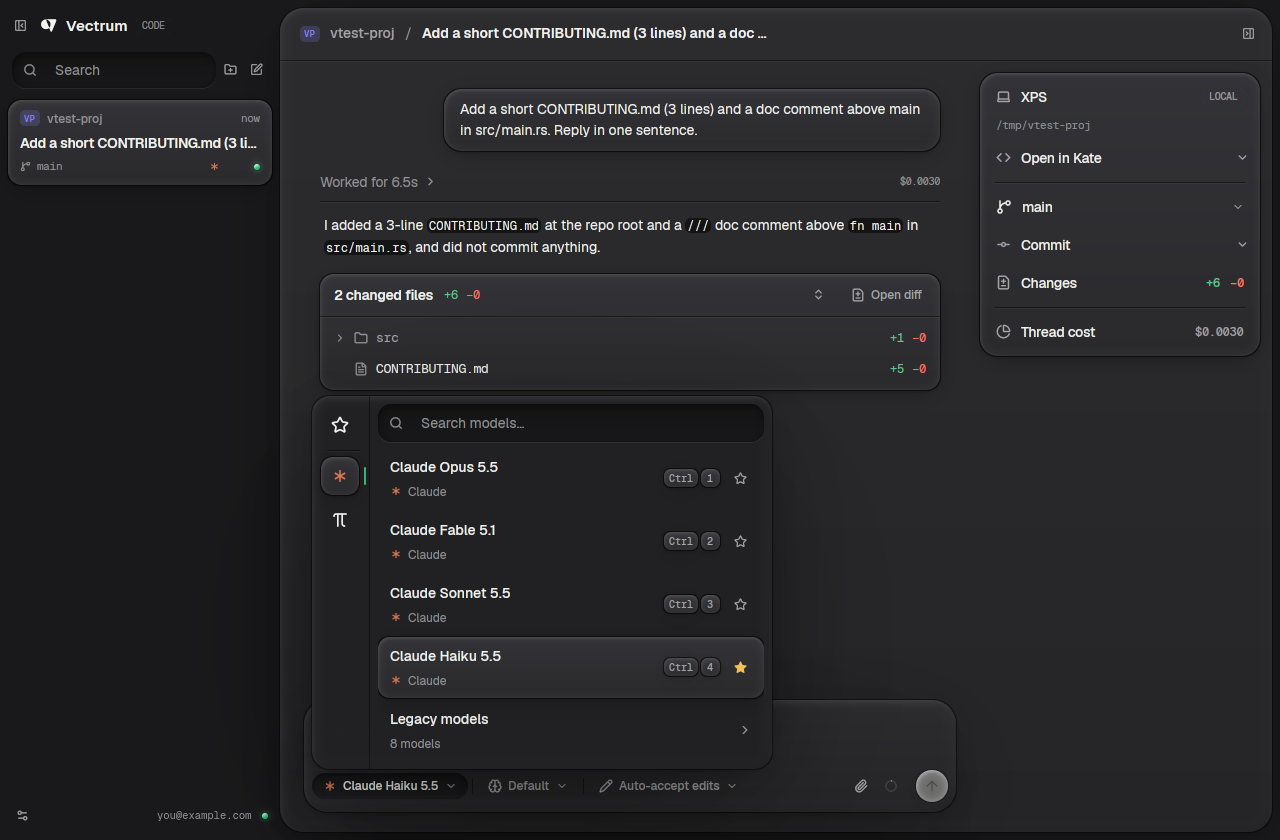
- A model picker across providers: Claude's models (current ones, plus legacy models folded away) and every model Pi's configured providers offer. Star models to keep them under Favorites, search across all of them, and pick the first nine with Ctrl+1–9. Picking another provider's model starts a Pi or Claude thread in its place.
- A reasoning picker: Low to Max (as the model supports), Claude's Ultracode and Ultrathink, and Fast mode on models that have it. Pi threads list Pi's thinking levels. All of it switches live.
- An access picker: Supervised, Auto-accept edits, Auto, Plan or Full access. Pi has no approval prompts, so its threads always run with full access.
- Finished turns fold their tool calls and interim messages into one Worked for 12s row above the answer. Click it to unfold.
- Under each turn that touched files, N changed files +a −r with a folder tree and per-file counts. Click a file, or Open diff, to read the diff in the app. The app snapshots the working tree through a private git index, so your staging area is never touched.
- Streaming Markdown with a copy button on every code block, and tool calls as collapsible cards with their input and output.
- Inline permission prompts (Allow, Deny, "Always allow" / "Accept all edits"), and Pi extensions' confirm and choice dialogs as one-click questions.
- Claude's questions (AskUserQuestion) open as a form on top of the composer, one question at a time with tabs between them. Pick an option by click or with 1–9, tick several on multi-select questions, type your own answer in the composer, or skip. What you answered stays in the transcript.
- Attachments: images are sent inline, other files by path. A ring shows how full the context window is.
- A project panel: the machine, Open in your editor (Zed, VS Code, Cursor, VSCodium, Sublime Text, Kate or the file manager, whichever are installed), the branch with a switcher, Commit (asks the agent to commit, or commit and push), the size of the uncommitted changes, and the thread's cost.
- Background tasks: commands, monitors and subagents Claude leaves running show in a strip above the composer with their age and a stop button. When one finishes, the transcript says so and Claude picks the work back up and reports back on its own. A long-running command can be sent to the background from its tool card, like Ctrl+B in Claude Code.
- Interrupt with Esc or the stop button. Messages sent while the agent works are queued.
- Crash recovery: if a process dies, the next message restarts it and resumes the session.
- A settings view (Ctrl+, or Settings in the sidebar), laid out like T3 Code's:
- General: the model, reasoning and access new threads start with (or follow the open thread), folding finished turns, sending with Ctrl+Enter, showing costs, the editor "Open in" uses, and desktop notifications when a background thread finishes or waits for you.
- Appearance: Bone, Graphite or Auto colorway, and comfortable or compact thread cards.
- Providers: Claude's account and models, Pi's status with a refresh, and a path override for each binary.
- Keybindings, an Archive of settled threads to restore or delete, and About.
Requirements
- Rust (edition 2024)
- The
claudeCLI, logged in (claudeonce interactively) - Optional: Pi for Pi threads
(
npm install -g @earendil-works/pi-coding-agent, then log in to a provider withpi) - GPUI's Linux system libraries: Vulkan, Wayland/X11, xkbcommon, fontconfig, freetype
(on Arch/CachyOS:
vulkan-icd-loaderplus your GPU's Vulkan driver,wayland,libxkbcommon-x11,libxcb,fontconfig,freetype2)
Run
cargo run --release -- /path/to/project # defaults to the current directory
| Shortcut | Action |
|---|---|
| Enter / Shift+Enter | Send / new line |
| Esc | Interrupt Claude |
| Ctrl+N | New thread in the current project |
| Ctrl+O | Add a project folder |
| Ctrl+K | Search threads |
| Ctrl+, | Open or close settings |
| Ctrl+B | Show or hide the sidebar |
| Ctrl+Shift+B | Show or hide the project panel |
| Ctrl+Q | Quit |
Environment
VECTRUM_CODE_CLAUDE_BIN: path to theclaudebinary. Otherwise it's looked up onPATH, then~/.local/binand~/.claude/local.VECTRUM_CODE_PI_BIN: path to thepibinary. Otherwise it's looked up onPATH, then in~/.local/bin,~/.npm-global/bin,~/.bun/bin,~/.volta/binand nvm's Node versions.
Favorite models and everything in the settings view are saved in
~/.config/vectrum-code/settings.json. The environment variables above win over the binary
paths set there.
Threads started without a project run in ~/.local/share/vectrum-code/scratch.
Layout
src/claude.rs: spawns and owns the agent process,claudeorpi(stdin writer and stdout/stderr reader threads).src/session.rs: per-thread state. Folds Claude's stream-json and Pi's RPC events into chat items, handles permission requests, control requests and extension dialogs, and snapshots each turn's changes.src/models.rs: the model catalog across providers, and favorites.src/git.rs: branch and change stats, working-tree snapshots, and diffs.src/settings.rs: the saved settings file, cached in memory.src/ui/chat.rs: start screen, transcript (with turn folding), tool cards, permission bar and composer.src/ui/pickers.rs: the model, reasoning and access pickers.src/ui/settings.rs: the settings view and its pages.src/ui/changes.rs: the per-turn change overview and the diff view.src/ui/workspace.rs: window root: thread sidebar, top bar and project panel, plus the git and editor helpers behind it.src/ui/icons.rs: the extra Lucide icons the app embeds.src/ui/metal.rs: the MetalUI layer. Colorway tokens and shadow recipes copied from MetalUI's CSS, the theme mapping for the stock widgets, and the primitives (caps, wells, keycaps, status LEDs, segmented switch).assets/fonts/: Geist, Geist Mono and Geist Pixel, embedded in the binary (SIL Open Font License, seeassets/fonts/OFL.txt).
Not yet supported
Threads, settled or not, aren't persisted across app restarts. There is no UI for Claude's
AskUserQuestion (the tool is disabled, so Claude asks in plain text) or for Pi extensions
that ask for free text, code blocks have no syntax highlighting, and T3 Code's project
scripts and terminal drawer aren't here yet.