Vectrum Code
A native T3 Code-style desktop client for coding agents, built with GPUI and GPUI Kit. It drives Claude Code, Pi and jcode.
Every thread runs its own agent process in the background. Claude Code threads talk to the
claude CLI over the stream-json protocol the Claude Agent SDKs use
(--input-format/--output-format stream-json plus the stdio control channel). Pi threads
talk to pi --mode rpc over its JSONL RPC protocol. jcode threads talk to
jcode api --stdio, a bridge to jcode's versioned harness API that starts jcode's shared
daemon if it isn't running, so jcode threads also show up in jcode's own session list.
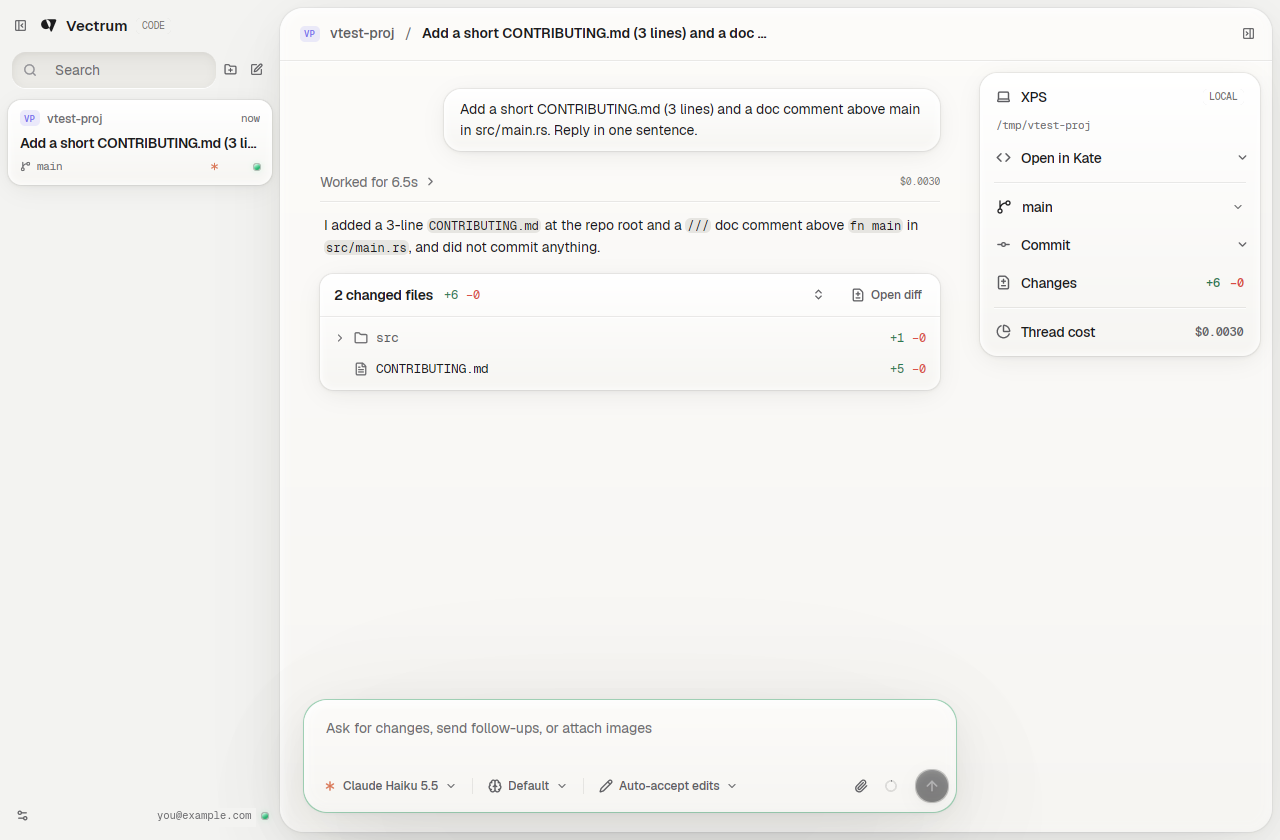
The layout and workflow follow T3 Code. The look follows MetalUI, the "soft hardware" design system vectrum.cc is built on: the conversation sits on a raised sheet, buttons are caps that sink when pressed, code and tool output sit in inset wells, and labels are engraved in mono caps. It comes in MetalUI's two colorways, Bone and Graphite, plus popular color schemes rebuilt in the same style: Tokyo Night, Catppuccin, GitHub, One, Nord, Gruvbox, Rosé Pine, Solarized and Dracula.
Features
- A sidebar laid out like T3 Code's inbox: unsent drafts, pinned and active threads, then the Working, Snoozed and Settled shelves. Each card shows the project, its branch or worktree, running processes, the pull request, the agent, and a status (Working with a timer, Approval, Input, Limited, Failed, Woke, Done) or how long ago it was active; hovering swaps that for Snooze and Settle, and a hover card sums the thread up. Search covers titles and conversations (↑ ↓ Enter, Esc clears), and the folder button filters the sidebar to one project. Drag the sidebar's edge to resize it.
- Settle a thread to stop its process and file it under Settled. Its transcript stays, and the next message resumes the conversation. Settling, snoozing, unpinning, archiving and discarding a draft leave a "Settled 1 thread, Ctrl+Z to undo" notice for 5 seconds.
- T3 Code's thread menu, on a right click in the sidebar or a click on the title in the chat header: New thread on branch, Pin, Settle, Snooze (in 1 or 3 hours, this evening, tomorrow, next week, or a custom date, time or duration), Wake, Rename, Regenerate title, Mark unread, Filter by project, Auto-settle behavior, Copy (path, branch, thread ID), Project settings, Archive and Delete. Ctrl+click or Shift+click picks several threads for one menu; a double-click renames in place.
- A command palette (Ctrl+K) with T3 Code's actions (new thread in a project or without
one, copy the thread ID or PR link, restart the agent, add a project, change the theme or
appearance, usage, settings) and recent threads; typing also finds projects, settings
and threads, and a leading
>searches actions only. - The legacy sidebar (Settings → Legacy sidebar): threads in per-project trees, with T3's sort menu (projects by last message, creation or by hand, threads by last message or creation, how many show) and project menu (Rename, Group into..., Copy Path, Project settings, Remove).
- A new thread opens on a start screen, "What should we build in project?", with the project as a picker (No project, the projects, Add project) and a way to start without a project ("What should we work on?").
- The composer is laid out like T3 Code's. Its footer holds the model, reasoning and access controls (they lose their labels, then fold into …, when the composer is narrow), the attach button and the send button, which turns into stop, steer or queue while the agent works. Its placeholder says what it takes: a message, your own answer to a question, feedback on a plan.
- Under a new thread's composer hangs T3's strip: the machine, the workspace (Current checkout, New worktree or Previous worktree) and the branch, with a searchable branch picker (current, worktree, remote and default branches, Create new ref, and Start from origin for a new worktree). Settings → Appearance → Composer context keeps it there once the thread has started.
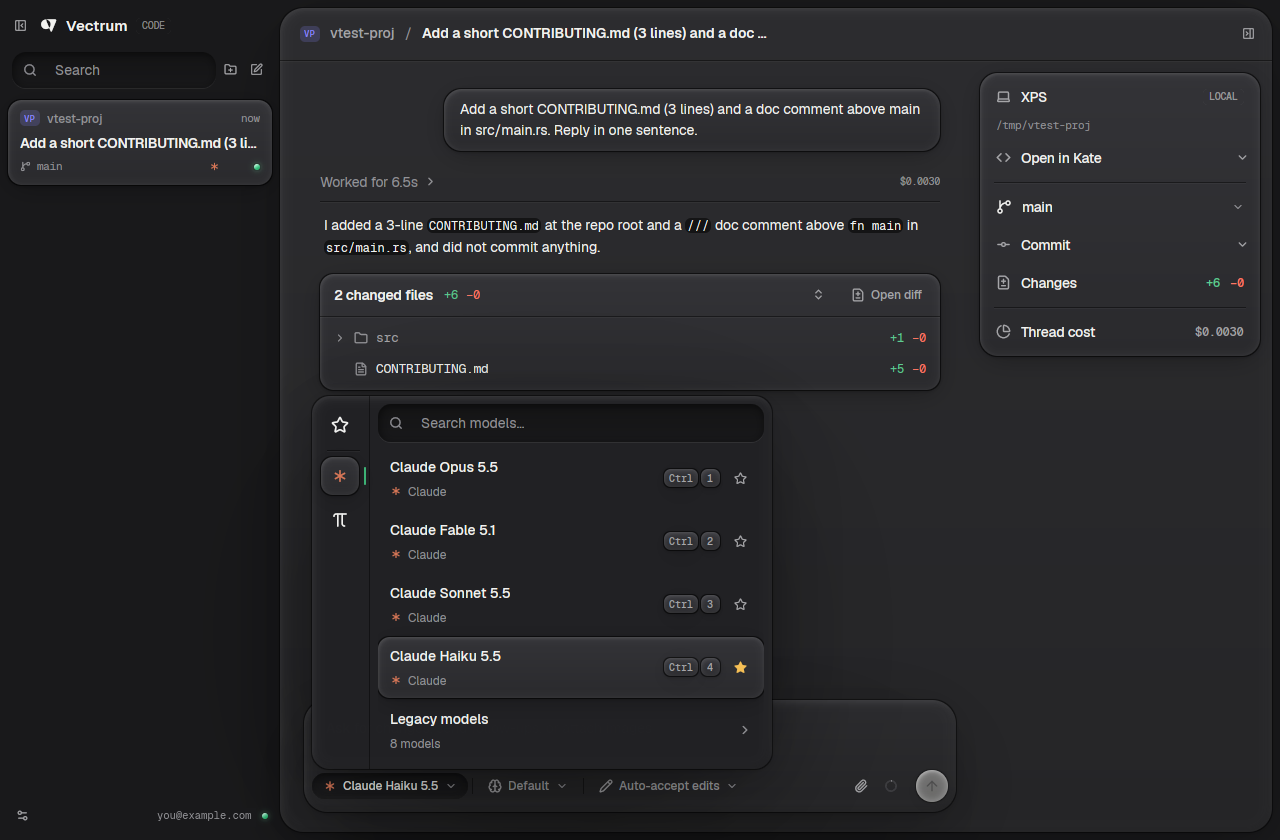
- A model picker across providers (Ctrl+Shift+M): a rail with Favorites and each provider,
Claude's models (current ones, plus legacy models folded away), every model Pi's configured
providers offer, and every model route jcode's logins and provider profiles make available.
Star models to keep them under Favorites, search across all of them, pick the first nine
with Ctrl+1–9, and switch providers with Ctrl+Shift+↑/↓. On a new thread, picking another
provider's model starts a thread of that kind in its place; once a thread has started,
other providers' models are greyed out, as in T3 Code.
/modelopens the picker too. - A reasoning menu (Ctrl+Shift+E): Low to Max (as the model supports, its default marked), Claude's Ultracode and Ultrathink, and Fast Mode on models that have it. Pi threads list Pi's thinking levels; jcode threads offer effort levels on its Anthropic, OpenAI and OpenRouter routes. All of it switches live.
- An access menu (Ctrl+Shift+A): Supervised, Auto-accept edits, Auto or Full access. Pi and jcode have no approval prompts, so their threads always run with full access. With plan mode turned on (Settings → General → Legacy features), a Build/Plan toggle and Shift+Tab switch Claude into plan mode and back.
- Finished turns fold their tool calls and interim messages into one Worked for 12s row above the answer. Click it to unfold.
- Under each turn that touched files, N changed files +a −r with a folder tree and per-file counts. Click a file, or Open diff, to read the diff in the app. The app snapshots the working tree through a private git index, so your staging area is never touched.
- Streaming Markdown with a copy button on every code block, and tool calls as collapsible cards with their input and output.
- What the agent waits on docks on top of the composer, as in T3 Code: an approval (the command or file, Decline, Approve, and Cancel or Always allow this session under …), Claude's questions (one at a time; pick with a click or 1–9, a single choice moves on by itself, tick several on multi-select ones, or type your own answer in the composer; Previous, Next question, Submit answers; fold or dismiss it), a Pi extension's confirm or choice, or Claude's plan (Plan ready, then Implement, Implement in a new thread, or type feedback and Refine). The transcript keeps what you answered.
- Docked there too: queued messages (drag to reorder, edit in the composer with Alt+↑, send now as a steer, remove), work left running in the background ("Running: …" with Stop), a usage limit, and the agent's task list with its progress.
- Ctrl+S puts the prompt aside; a Stash tab beside the composer brings it back.
- Attachments: images are sent inline, other files by path.
@lists the thread folder's files and folders to mention. An optional ring (Settings → General → Legacy features) shows how full the context window is, with the numbers and Compact context on hover. - A project panel: the machine, Open in your editor (Zed, VS Code, Cursor, VSCodium, Sublime Text, Kate or the file manager, whichever are installed), the branch with a switcher, Commit (asks the agent to commit, or commit and push), the size of the uncommitted changes, and the thread's cost.
- A right panel, as T3 Code has it: its button in the top bar (Ctrl+Alt+B) opens "Open a surface", which lists the subagents, the browser, a device and a terminal, keyed S, B, D and T. A terminal there holds the thread's terminals instead of the drawer under the conversation.
- A subagents panel (Ctrl+Alt+S, or S in the right panel), in the project panel's
place: every subagent the thread started, the working ones first with what each is
doing right now (its latest tool call and progress summary), how long it has run, its
kind, tool uses and tokens, then the finished and failed ones. Every working one has a Stop button. Click one to jump to its call in the conversation. While the
panel is closed, a light on the right panel's button says subagents are working. It covers Claude's
Task and Agent calls; Pi's
subagentextension (a row per task, single, parallel or chained); and jcode's swarm, whose agents keep working in sessions of their own after the turn ends: the app checks on them every few seconds through jcode's session list, and reads what each last said. - App-owned subagents, as T3 Code has them: every agent gets
delegate_task,task_status,task_cancelandorchestrator_capabilities, with instructions for them. A delegated task runs in a subagent thread in the parent's folder, on the parent's agent and model or any other agent and model the app has (Claude, Pi or jcode). The subagents panel shows it working and opens its thread. The thread is left out of the sidebar, and its header leads back to the parent. When the task finishes, its answer goes to the call waiting on it (mode: "wait") or reaches the parent's agent as a message the transcript doesn't show, which wakes it. Nothing to install: Claude reaches the tools through an MCP server the app runs on loopback, with a token per thread. Pi reaches them through an extension the app writes and loads with--extension; before every run, that extension also switches off Pi's other subagent tools. jcode gets them as session tools over its API, with itsswarmandscheduletools turned off. Subagents can't delegate tasks of their own. - Background tasks: when a command, monitor or subagent Claude left running finishes, the transcript says so and Claude picks the work back up and reports back on its own. A long-running command can be sent to the background from its tool card, like Ctrl+B in Claude Code.
- A browser the agent and you share (Ctrl+Shift+E, or the globe in the top bar), on
Vercel's agent-browser: each thread has
its own headless Chrome session, which its agent drives with the
agent-browserCLI while the panel shows it live. Click, scroll and type in the page yourself, or go to a URL. When the agent opens a page while the panel is closed, a light on the globe says so. - A Device panel, as T3 Code's Device hub (D in the right panel): iOS Simulators and
Android Emulators live next to the thread, streamed by Expo's
expo-device-hub. First use walks through
three steps (the device hub, simulator support, agent access); nothing installs or
starts before you agree. Pick a running device to watch it, or Start a stopped one.
Each device opens in a tab of its own (+ for another; double-click or right-click a
tab to rename it), and only the tab showing streams. The screen takes taps, drags and
typing; the rail beside it has Home, Back and Recents on Android, rotation, dark mode,
text size, a screenshot, Float device over chat (a small window you drag by its
handle and resize from any edge) and Power off device. The Tools drawer shows the
foreground app and switches appearance, text size, accessibility settings, orientation
and network, overlays the accessibility element frames, sets a fake location and grants
or revokes app permissions, each value read back from the device. Android video is
H.264, decoded in the app with OpenH264; iOS comes as MJPEG. Agents get
device_list,device_open,device_screenshotanddevice_close, and drive devices with the agent-device CLI through a launcher the app puts on their PATH. A device an agent opens floats over the chat (or opens in the right panel with Auto-show floating preview off), and its activity shows in the timeline. Both tools are npm packages the app installs at pinned versions into its data folder and runs with your Node; quitting stops them, while simulators and emulators keep running. - A terminal drawer under the conversation, like T3 Code's (Ctrl+J, or the panel toggle in the chat header): each thread has its own terminals, which start in the thread's folder (its worktree when it has one). Drag the drawer's top edge to resize it. Split a terminal side by side (Ctrl+D) or stacked (Ctrl+Shift+D), up to four per group, or open another (Ctrl+N while a terminal has focus); with several, a sidebar lists the groups. Close one with Ctrl+W or the trash button (after a confirmation); a terminal whose shell exits closes on its own. Right-click for Add to chat (puts the selection in the composer), Copy, Paste, Select all and Jump to latest; Ctrl+Shift+C / Ctrl+Shift+V copy and paste.
- Interrupt with Esc or the stop button. Messages sent while the agent works are queued.
- Crash recovery: if a process dies, the next message restarts it and resumes the session.
- Threads are saved as you go and come back after a restart, settled ones included; the next message resumes the conversation. Optionally, threads a crash or restart interrupted continue on their own.
- New threads can start in a git worktree of their own, made like T3 Code's when the first
message is sent: a temporary
vectrum/<8 hex>branch checked out in a folder named after it (under~/.local/share/vectrum-code/worktrees/<project>, or the worktree location in Settings → Storage), optionally from origin's copy of the base branch, with submodules filled in. A setup card shows each stage (with Work locally and Cancel), and the branch is then renamed after the first message (Settings → Source Control → Worktree branch naming: a prefix plus a few words, a semantic prefix likefeat/, or your own instructions). Ctrl+Shift+L starts in the project's previous worktree instead. - Thread titles written by a small model from the first message (Settings → General → Text generation).
- Pin threads to the top, snooze them until later, rename them, archive them to Settings → Archive. Working threads can fold into a Working shelf until they need you.
- When a usage limit stops a thread, it can snooze until the limit resets and continue then. Idle threads, and worktree threads whose pull request merged, can settle on their own.
- Send while the agent works to steer it, or queue the message for after the turn (and Ctrl+Enter for the other one). Queued messages wait above the composer.
- A
/menu with Claude's commands and skills ($for skills alone), docked on the composer. - Diffs with hidden whitespace changes, foldable files, line numbers, and a stacked or side-by-side layout.
- Remote connections, like T3 Code's environments: turn on Allow remote connections on one device, and paste its pairing code (address and key) under Settings → Connections on another. The host's projects and threads appear in the sidebar tagged with its name; open, continue or start threads there and they run on the host. The first time a device connects with settings that differ from yours, a dialog asks whether to give it your settings or leave its own as they are. The connection is a WebSocket guarded by the key but not encrypted, so use it on trusted networks or over a VPN.
- A settings view (Ctrl+, or Settings in the sidebar), laid out like T3 Code's: a
search field over the pages (press
/to search, ↑/↓ and Enter to jump to a setting, which scrolls into view and pulses), a "Settings / Page" breadcrumb, and every setting as a row with its description, its control and, once changed, a button that resets it. Restore device defaults on General lists what it will reset before it does. General, Integrations, Source Control and Storage open with T3 Code's "Applying settings for All projects across All environments": the settings that shape threads (new thread defaults, auto-settle, worktrees and their cleanup, branch naming, writing style, text generation, browser access) belong to the machine the threads run on, so you can edit this device's, one connected device's, or every connected device's at once. A Mixed tag shows where they disagree (hover for each one's value), and picking a value applies it to all of them; offline devices keep theirs. Pick a project to override settings for it on the selected devices: overridden rows say Override, and their reset button returns them to the environment's value. Device preferences, such as appearance and confirmations, ignore the selection.- General: New threads (model and reasoning, permissions, workspace, submodules);
Organization (project grouping and order, auto-resume and snooze for usage-limited
threads, the Working section, auto-settling merged and inactive threads); Behavior
(thread notifications off, as notifications, as sound or both, in-app notifications, time
format, response streaming by token, paragraph or whole turn, turn folding and costs, diff
whitespace, file state and Stacked or Split layout, proactive panels, skills in the
/menu, the rich text composer, collapsing on scroll, the send shortcut (Enter, Ctrl+Enter for multiline prompts, or Ctrl+Enter always), follow-up behavior, update checks, continuing after restarts, background activity); Projects & threads; Confirmations (unpin, archive, delete, and the quit shortcut: Direct, Hold or Double press); the text generation model; the version; Diagnostics (CPU, memory and every process the app started, with interrupt and kill buttons) and the open source licenses; and the folded Legacy features (plan mode, the context window ring, the per-project sidebar). - Appearance: System, Light or Dark (System follows the desktop), and a card per theme family whose swatches set the light and the dark theme: Vectrum (Bone and Graphite); Tokyo Night (Day, Night, Storm); Catppuccin (Latte, Mocha, Macchiato, Frappé); GitHub (Light, Dark, Dark Dimmed); One; Nord; Gruvbox; Rosé Pine (Dawn, Main, Moon); Solarized; and Dracula. Then diff colors (red and green, or blue and orange), composer context, chat width and thread cards.
- Keybindings: the app's shortcuts in T3 Code's groups, searchable, read from the live keymap, with when each applies.
- Providers: every agent instance (several Claude, Pi or jcode instances side by side,
say two accounts) in a list with its status and a switch, and an editor for the selected
one: display name and accent color, account, binary, home folder, Claude's auto-compact
threshold, launch arguments, environment variables (sensitive ones are kept in a
secrets.jsononly you can read), and its models: favorites, which ones the picker shows, their order, and custom models. Add provider walks through kind, identity and configuration. Below: usage hubs (CLIProxyAPI servers) and the health check interval. - Integrations: whether agents may use the shared browser, whether an agent's device floats over the chat, the device hub, simulator support and agent device access (each tool's running, required and installed versions), and the editor "Open in" uses.
- Source Control: the git and GitHub CLI found on this machine, and how worktree branches are named (a static prefix, a prefix the model picks, or your instructions).
- Storage: where new worktrees go, and the app's folders.
- Connections: remote connections to and from other devices.
- Archive: settled threads by project, with Unarchive (and Delete on right-click).
- Usage: cost, tokens and plan limits over the past day, week, month or quarter, read from Claude Code's and Pi's local logs and any usage hubs, by provider, model and day.
- General: New threads (model and reasoning, permissions, workspace, submodules);
Organization (project grouping and order, auto-resume and snooze for usage-limited
threads, the Working section, auto-settling merged and inactive threads); Behavior
(thread notifications off, as notifications, as sound or both, in-app notifications, time
format, response streaming by token, paragraph or whole turn, turn folding and costs, diff
whitespace, file state and Stacked or Split layout, proactive panels, skills in the
Requirements
- Rust (edition 2024)
- The
claudeCLI, logged in (claudeonce interactively) - Optional: Pi for Pi threads
(
npm install -g @earendil-works/pi-coding-agent, then log in to a provider withpi) - Optional: jcode for jcode threads
(
curl -fsSL https://jcode.sh/install | bash, thenjcode login) - Optional: agent-browser for the browser panel
(
npm install -g agent-browser && agent-browser install) - Optional, for the Device panel: Node.js 22 or newer with npm, and the Android SDK
(Platform-Tools, Emulator, Command-line Tools (latest)) with a virtual device made in
Android Studio's Device Manager, or Xcode on macOS for iOS Simulators. The SDK is found in
its standard locations or through
ANDROID_HOME. - GPUI's Linux system libraries: Vulkan, Wayland/X11, xkbcommon, fontconfig, freetype
(on Arch/CachyOS:
vulkan-icd-loaderplus your GPU's Vulkan driver,wayland,libxkbcommon-x11,libxcb,fontconfig,freetype2)
Run
cargo run --release -- /path/to/project # defaults to the current directory
The shortcuts follow T3 Code's default keymap.
| Shortcut | Action |
|---|---|
| Enter / Shift+Enter | Send / new line |
| Esc | Interrupt Claude |
| Ctrl+K | Command palette |
| Ctrl+N (or Ctrl+Shift+O) | New thread (picks the project when there are several) |
| Ctrl+Shift+N | New thread in the current project |
| Ctrl+Alt+N | New thread without a project |
| Ctrl+Shift+[ / Ctrl+Shift+] | Previous / next thread |
| Ctrl+1–9 | Jump to a sidebar thread (hold Ctrl to see the numbers) |
| Ctrl+Shift+S | Settle the thread, or un-settle it |
| Ctrl+Shift+P | Pin or unpin the thread |
| Ctrl+Z | Undo the last settle, snooze, unpin or archive (while the notice shows) |
| Ctrl+Shift+C | Copy the thread's PR link, or its ID |
| Ctrl+U | Usage |
| Ctrl+Alt+A / Ctrl+Alt+Shift+A | Change the theme / cycle System, Light and Dark |
| Ctrl+Shift+M / E / A | Model picker / reasoning / access |
| Ctrl+Shift+G / X / H | Branch / workspace / machine (new thread) |
| Ctrl+Shift+L | Start in the previous worktree |
| Ctrl+S | Stash the prompt, or open the stash |
| Alt+↑ | Edit the last queued message |
| Ctrl+F | Find in thread |
| Ctrl+B | Show or hide the sidebar |
| Ctrl+J | Show or hide the terminal drawer |
| Ctrl+D / Ctrl+Shift+D | Split the terminal side by side / stacked (terminal focused) |
| Ctrl+N / Ctrl+W | New terminal / close the terminal (terminal focused) |
| Ctrl+Shift+C / Ctrl+Shift+V | Copy / paste in the terminal |
| Ctrl+Alt+B | Show or hide the right panel: Open a surface |
| Ctrl+Shift+B | Show or hide the thread details (project panel) |
| Ctrl+Alt+S | Show or hide the subagents panel |
| Ctrl+O | Add a project folder |
| Ctrl+, | Open or close settings |
| Ctrl+Q | Quit |
Environment
VECTRUM_CODE_CLAUDE_BIN: path to theclaudebinary. Otherwise it's looked up onPATH, then~/.local/binand~/.claude/local.VECTRUM_CODE_PI_BIN: path to thepibinary. Otherwise it's looked up onPATH, then in~/.local/bin,~/.npm-global/bin,~/.bun/bin,~/.volta/binand nvm's Node versions.VECTRUM_CODE_JCODE_BIN: path to thejcodebinary. Otherwise it's looked up onPATH, then in~/.local/binand~/.cargo/bin.
Favorite models and everything in the settings view are saved in
~/.config/vectrum-code/settings.json. The environment variables above win over the binary
paths set there for each agent's first instance. Threads and the project list live in
~/.local/share/vectrum-code (threads/, state.json); threads started without a project run
in its scratch folder.
Build and release
./build.sh builds the release binary and an AppImage into build/. -v 0.1.2 first sets the
version (in Cargo.toml and Cargo.lock, committed as "Version 0.1.2"), and --release (or
-r) publishes the build on Vectrum: it tags the commit with the version, pushes the tag, and
uploads the AppImage, the binary and SHA256SUMS, which publishes the release. So
./build.sh -v 0.1.2 -r makes and publishes 0.1.2. Releasing needs a clean working tree, a
version not tagged yet, and a read & write API token in VECTRUM_TOKEN or
~/.config/vectrum/token; the version commit stays on your branch until you push it.
VECTRUM_URL (https://vectrum.cc) and VECTRUM_REPO (from the origin remote) pick where
it goes.
Layout
src/claude.rs: spawns and owns the agent process,claude,piorjcode api --stdio(stdin writer and stdout/stderr reader threads).src/session.rs: per-thread state. Folds Claude's stream-json, Pi's RPC and jcode's harness API events into chat items, handles permission requests, control requests and extension dialogs, and snapshots each turn's changes.src/models.rs: the model catalog across providers, and favorites.src/git.rs: branch and change stats, working-tree snapshots, and diffs.src/settings.rs: the saved settings file, cached in memory.src/terminal.rs: a shell in a pseudo-terminal, emulated byalacritty_terminal, and the bytes keys and pastes send to it.src/ui/terminal.rs: one terminal's view: the grid in the mono font, cursor, selection, scrollback and its right-click menu.src/ui/chat.rs: start screen, transcript (with turn folding), tool cards, permission bar and composer.src/ui/pickers.rs: the model, reasoning and access pickers.src/ui/settings/: the settings view (mod.rs: nav, search, top bar), the row and section building blocks (widgets.rs), the search catalog (search.rs) and a file per page.assets/licenses.tsv: the crates the app is built from, with their licenses, for the Open source licenses page (regenerate it fromcargo metadataafter changing dependencies).src/ui/changes.rs: the per-turn change overview and the diff view.src/ui/workspace.rs: window root: thread sidebar, top bar and project panel, plus the git and editor helpers behind it. Its submodules hold the sidebar (sidebar.rs, and the legacy layout insidebar/legacy.rs), the thread menus, snoozing, confirmations and undo (actions.rs), the chat header (header.rs), the command palette (palette.rs) and the terminal drawer (terminal_drawer.rs).src/ui/icons.rs: the extra Lucide icons the app embeds.src/ui/metal.rs: the MetalUI layer. Colorway tokens and shadow recipes copied from MetalUI's CSS, the theme mapping for the stock widgets, and the primitives (caps, wells, keycaps, status LEDs, segmented switch).src/ui/themes.rs: the color schemes, the palette builder that turns each into a full MetalUI palette, the light/dark/system selection, and the theme families.assets/fonts/: Geist, Geist Mono and Geist Pixel, embedded in the binary (SIL Open Font License, seeassets/fonts/OFL.txt).
Not yet supported
There is no UI for Pi extensions that ask for free text, code blocks have no syntax highlighting, and T3 Code's project scripts aren't here yet. The terminal drawer doesn't report mouse clicks to full-screen programs (only the wheel), open links, or show T3's popup after a selection. jcode models can't write thread titles (every jcode run is saved as a session), and jcode's side panel, applets and background-task progress aren't shown.